Sunday, September 22, 2013

SEO when changing CMS or page structure

What SEO steps should be followed to prevent negative impact when changing CMS and/or site structure ?

This subject will be divided on the following sections:
  1. My scenario
  2. SEO steps when designing the new website
  3. The results
  4. How We did it
  5. Putting the website online

My scenario

This section introduces the reason for changing the website structure and the CMS and isn't required to understand the technical steps taken.

I was hired by a consulting company called Kaizen Institute Consulting Group and my main goal was to turn an outdated website in a clean, well designed and easy to manage system. At the time, all countries were using a TYPO3 instance as the CMS of choice and because I was fresh out from college and didn't know much about the system I started studying it.

After several experiments, reading a lot of documentation and talking with typo3 users I understood the following:

If your goal is to have a responsive, flexible, feature rich and customized website then forget TYPO3. The documentation is awful, it's based on one of the most stupid scripting languages (typo script, which basically forces you to memorize non-logical stuff) and has a terrible customization architecture based on extensions.

The only scenario I see typo3 to be an option is for multi-language websites (based on a sub domain approach), where most of the pages are static and the main goal is to display non-Ajax content.

But for our website we had ambitious requirements:
  • Rich online event booking system that would allow each country to specify different forms for their participants with deep Ajax filtering options and connection with our existing booking management system
  • Online payment system
  • A complex success stories data base
  • Complete control of the crawlable HTML code
  • Effective spam controlling
When we start understanding the hours required to study and implement this using TYPO3 extension system, Kaizen Institute IT Leader had the courage to say "We need to drop typo3 and go with something different. Let's build our own CMS". This was at a time when I actually had a redesigned and improved version of the website running on an updated TYPO3 instance which took approx a month of development and deadlines were around the corner. So, without a moment to lose we started developing a new CMS tailored to our needs but flexible enough that would be easy to add new features.

After one month and a half, we had a custom backed CMS and a fronted. It's worth mentioning that we are a two man team and while I ended up implementing most of the system, due to improvements that needed to be made on our internal project managing system of which my colleague was considerable savvier than me, my time wasn't dedicated only to development as I had to provide support to the 25 counties Kaizen Institute has offices in, which amounts to 400+ employees.

Because we were aiming for global standard content that would be localized by each country, it was time to align the different visions from each country regarding the website content. When we finished implementing the improvements it was time to submit to the multiple search engines and hope we had done a solid SEO job.


SEO steps when designing the new website


SEO steps have flooded the internet and most of them give you pretty straight forward directives but don't seem to be supported by actual facts, being, in my opinion, just someone's else opinion. So I've put together a SEO list based on facts.

Then I follow a SEO checklist in order to create search engine optimized content, which is based in my opinion, what I've read and common sense.


SEO and social media integration


Although social media linking isn't as powerful as a reference from a reputable web site, it helps "spread the word" and improve branding. As such, and because we would have a couple of douzen countries creating content for the website, we wanted to harvest all that content and share it with others through social media, more precisely twitter, Facebook and LinkedIn.

Optimizing social media posting through scheduling

Until then I was the main responsible for handling Kaizen twitter and Facebook accounts, every time we had some relevant news like events promotions or global benchmark tours I'd posted it. There was one issue though, because I wasn't on the same time region as many of our potential clients, the posts weren't' being shared at the optimal time (target group was sleeping).

To fix this issue I started using the social media scheduling app called "bufferap" which allowed me to set when my posts should actually be posted on the social media networks. I set my posting schedule based on this study.

I wanted to give the same option to our CMS users, this way they could add a new Kaizen Institute success story to the website at 2 in the morning but instead of being lost among other posts during the night it would "freshly" popup at 8 am during a potential client breakfast twitter reading.

So we added this feature to the CMS. Whenever an user adds a news to the website it only takes a click on the option "share" to send it to Facebook, twitter or linked in (a preview is displayed to the user and the twitter version is shorten). During the content preview the user has the option to share it immediately or saving it on the "buffer" to be posted later. This feature was implemented using bufferapp's straight forward api.

Ajax and SEO


We added a rather complex but intuitive lean events calendar which is filtered and then update by Ajax.

Ajax is great for fast and real time behavior but has the downside of not being as SEO friendly as static content. So we wanted to achieve two things when using Ajax:
  • Give a faster and more app-like experience
  • Keep history behavior. 
Ajax browser history mean that three things needed to happen when a user would, for example, change the Lean Events filter type to only display tours:
  1. The URL would change to the same state as if the user wasn't requesting by Ajax
  2. The content was loaded dynamicly using Ajax
  3. If the user pressed the browser back button it should take him to the state before applying the refered filter
To achieve this we used jQuery Address and it was applied in our success stories list and our events calendar (try changing the filters or browsing the success stories and then hitting the browser back button).

SEO Results


Our main goal was to redesign the website by giving it a more professional, global, clean and fresh look. So we came from this:

Kaizen Institute Website Old Layout
to this:


But we wanted to keep and if possible even improve the website visits.

When making a drastic change like ours and considering a lot of our traffic comes from organic search, it's normal for the hits to decrease but it in our case they actually increased and considerably (we made the transition on the morning of September 18th).

The visits:
Our visits increased about 57% and added to that the bounce rate also improved:

The bonce rate (lower is better):

Our bonce rate went from 73.24% to 47.8% meaning people would visit more pages inside our website instead of leaving it.

Pages / Visit
Our pages per visit went from 1.73 to 5.74 in the day of moving.

In my opinion this means we took the necessary SEO steps to at least allow the website improvements to overcome any negative search index impact.

How we did it?


SEO and changing CMS


Changing CMS, if done properly, shouldn’t have a negative impact in search ranking. The following guidelines are what to expect for a Search Engine friendly CMS:

Customizable page title, page description and menu names. The user should have full control over the page title and description meta tags

URLs Customization. Having keyword rich URLs is a good SEO practice and as such the CMS should allow to define a page’s url. It’s better to have www.kaizen.com/about-us/kaizen-institute.html then www.kaizen.com/index.php?id=22.

The HTML generated by the CMS should be clean and compliant to the W3C standard (valid html).

A considerable plus would be allowing to highlight data throught the schema.org rich snipets (more info). In our case we used it to mark our Lean Events

SEO and changing Website Structure


Ok this is the tricky part. First things first, changing website structure will have search index impact and you should do it if you are sure it’s a needed improvement and that in the long run it's a better fit for your business. I'm not saying don't do it, I'm saying this is not a decision to take lightly (SEO wise) and as such it should be done with commitment in mind, not something that will be changed every other month.

The goal of these steps is to prevent a simple but critical event, the 404 error. When you change the website structure Google might show a search result with an URL to a page that either doesn't exist anymore or has a new URL. If the user follows that link a page giving the “Not found” error is displayed and Google eventually will also get the same error when refreshing its index. When that happens the page is removed from Google’s index and all the page rank owned by that now extinct page will be lost, resulting in a decreased search index position.

The steps we took were the following:
  1. Write down the fundamental structure of the new website
  2. Check in Google analytics the top visited pages in the present website
  3. From those see if it makes sense to include them in the new structure. If some of the old pages really attract a lot of hits then consider at least keeping them at the beginning and then phase them out.
  4. Check with Google analytics or another tool the most famous back links (referrals) and take note of the ones that were removed and shouldn't be part of the new structure.
  5. If possible change the referral URLs. All of the back links pointing to your website should be changed to the new URL if possible (which usually isn’t).
  6. Do 301 permanent redirects. The previous steps were in preparation for this one, all of the URLs that aren't part of the new structure should return a HTTP 301 header with the new URL. This tells search engine that the content on that page was moved permanently to a new URL, so instead of getting a 404 error Google thinks “the content isn't gone it just changed pages”. Based in Matt Cuts videos, 301 shouldn't have a negative impact in page rank compared to normal links.
    I.E: if you access www.kaizen.com/kaizen-events.html the browser will be redirected to www.kaizen.com/events.html due to a 301 response.
  7. Parse the website for link errors. Use a tool like Xenu which gives a report about links that are pointing to un-existing pages.

At the this point the new structure should go live. If the new website is on a new server then change the DNS and lower the TTL (time to leave).

It's now time to ask Google to crawl the website and check if it's accessing the new structure. To do that login into webmaster tools and chose the option "Cawl - Fetch as Google"and take a look into the resulting HTML. Take the opportunity to submit to Google index.

To speed up Google knowledge about the website consider submitting a sitemap, the recommended schema is to have it under www.domain.com/sitemap.xml.

Do the same for Microsoft Bing and that's it.

So to summarize the crucial steps of changing a website structure are:
  • Consider the possibly of keeping the most "famous" links
  • 301 extinct or moved links, at least the crucial ones
  • Check for broken links
  • Submit to webmaster tools and check regularly for errors
If you have any questions please let me know through the comments section.

SEO page check list

When developing a website page I follow this checklist to be sure the content and structure is search engine optimized (SEO):

Before creating the content:

  • Make sure the subject is well defined
  • Think about several keywords users would search for
  • Use Google Keyword Planner tool (available in Add Words accounts) to find the “valuable” keywords for the subject
  • Write the content so it’s easy to read and to look at.

After creating the content:

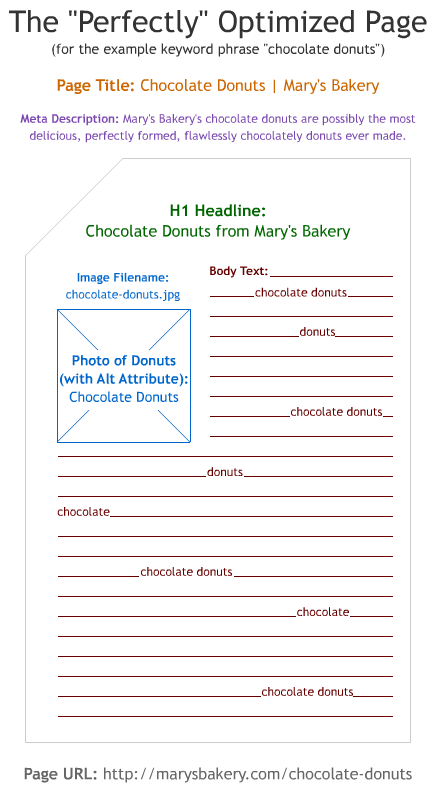
  • URL (alias) contains keywords and are separated by “-”
  • Page description is unique, has keywords and summarizes the content in less than 160 characters
  • Page title has keywords and the more relevant are near the start
  • Headings have keywords
  • Images don’t contain important text in it, have “alt” attribute and filename with relevant content
  • Links have keywords on the anchor text
  • Page body has keywords but not in an exaggerated amount
  • If applicable share the content through social media

Wednesday, July 10, 2013

SEO Guidelines based on facts

All of the following guidelines are supported by reliable sources detailed on the bibliographic reference. This is a summarized list about what I consider to be the most relevant guidelines to create SEO content for a website.

What is the ideal keyword density of a web page?

How much keywords should a web page have considering the total word count?

There isn't a specific amount of keywords per page. The incremental weight given to a keyword lowers with the amount of repetitions. If the keyword occurs an excessive number of times it’s consider keyword stuffing and search score starts to decrease. 1

How much content should a page have ?

There isn't an exact number. The idea is “keywords help page ranking and in order to have keywords it needs to have content”. So, there should be enough content to contain the most important keywords but not too much that it seems text is created just to have them (keyword stuffing) and it should tackle a specific subject. Not to much that discourage the user and not to small that has no room for keywords.

Page Guidelines

When building a page these are the most important guidelines 5:
  1. Create  quality content (clear, helpful, accurate, information-rich,original) while using keywords that clients would search for. (using Google keyword tool is a good idea)
  2. Make sure other sites link to the website in a natural way. The links quality (if they have keywords searched by the user in the link itself) and the reputation of the source page meters. (Blogging and social media helps)
  3. Structure your website content correctly while making sure at least the following elements have keywords (“the”,”and”,”etc” don't count) :
    1. Page title ( 65-75 characters with more important keywords closer to the start
    2. URL 
    3. Introduction paragraph 
    4. Page description (to display on search result, keyword scoring isn't consider, 160 characters approx) 4
    5. Images aren't crawlable so don't rely on them to deliver keyword content. Images should always have a descriptive "alt" attribute and a suggestive file name.4
    6. Provide information when linking, instead of "click here" use "more info on consulting services".

Does Google use the “keywords” meta tag?

No.2

Do spelling and grammar matter when evaluating content and site quality?

Indirectly. Although it doesn't impact search index score directly, high search scored websites tend to have well written content. Basically it’s common sense that easy to read and well written content tends to score better because users will link more frequently to it.3

Does translated content cause a  duplicate issue?

No, if they are in different languages and it's a quality translation. On the other hand if it's the same content on the same language (I.e: us.kaizen and uk.kaizen.com) then it might be penalized. 1:1 translation is fine.6

How should localization be handled domain wise ?

After top level domains (kaizen.com,kaizen.fr) sub domains are the next best choice7

Are Social Shares the Same as Links?10
In a word, no. Although there is evidence that social shares such as Tweets, Likes, and Plusses affect rankings, at this time links are considered a far superior and more lasting way to promote the popularity of your content than any other method.

Do pdf files rank the same as standard web pages ? 11

Generally no.This is due to the simple fact that usually a pdf file is less likely to be linked to because they require a higher time investment by the user(obviously pdf should be text based and not image based).

Quality content and reliable website linking to it are the most important steps 8

UK Kaizen Institute Consulting Group was designed with these facts in mind.


By moz.com

Bibliographic Reference

Matt Cuts is currently the head of Google’s Webspam team and he’s also responsible for developing SafeSearch first version.
Moz is a well known marketing and SEO company with almost a decade
1 - What is the ideal keyword density of a page? Matt Cuts (http://www.youtube.com/watch?v=Rk4qgQdp2UA)
2 - Does google use the “keywords” meta tag?Matt Cuts (http://www.youtube.com/watch?v=jK7IPbnmvVU)
3- Do spelling and grammar matter when evaluating content and site quality? Matt Cuts
6 - Does translated content cause a duplicate content issue? (http://www.youtube.com/watch?v=UDg2AGRGjLQ)
7 - How should I handle localized content? (http://www.youtube.com/watch?v=GyWx31GeQWY)
8 - On-Page Ranking Factors - SEO Best Practices - Moz (http://moz.com/learn/seo/on-page-factors)
11 - What are the best practices for PDF optimization? http://www.youtube.com/watch?v=oDzq-94lcWQ

Saturday, November 3, 2012

Building a Reporting Tool on Top of Analysis Services: Understanding OLAP


In order to effectively build a reporting tool, one first needs to understand On-Lyne Analytical Processing (OLAP).


1.1  What is OLAP?

OLAP can be viewed as a method of aggregating data in a way that facilitates the construction and interpretation of queries on multidimensional databases. OLAP tools give business analysts with reduced knowledge of query languages the ability to explore complex databases because it structures the data according to dimensions, hierarchies, levels and measures that are easily transposed to the nature of the business they are analyzing. Instead of dealing with complex notions like foreign keys, indexes and primary keys, the user intercepts dimensions like “Product” and “Time” and drills down through levels according to the desired degree of detail.

1.2  How does OLAP work?

OLAP relies on multidimensional cubes to aggregate data and the queries are defined considering the following principles:
·         Dimensions: Several defined areas that make sense to group the data. For example, it makes sense to aggregate all the months, weeks and days under the dimension TIME.
·         Hierarchies: How dimensions are structured. A dimension can have several hierarchies because the same data can be organized according to different rules.
·         Levels: Levels are like a zoom in and out tolls, they help the user to drill down and up in detail.
·         Measures: Measures, although a component of OLAP, are a specific dimension of the OLAP-Cubes that consists of the output the user wants to know, usually a numerical indicator.
Let’s consider the following example in order to understand each of the principles explained:
“A business analyst, working for a car dealer, wants to know the net sales and the gross sales in Germany during the first quarter of the current year.”
For this he needs to use the Sales OLAP cube that, for this purpose, has the following structure:

Dimensions
Hierarchies
Levels
Members (Examples)
Operational
Country
Country
Germany
Dealer
Make
Mazda
Stand
Major MAZDA, Inc
Time
Calendar/Standard Time
Year
2012
Quarter
Month
March
Day
3rd
Week Time
Year
2011
Week
25
Day
Monday
Measures
Measures
Measures Level
Net Sales; Gross Sales


In the example depicted the user could use the shaded blue parameters in order to query the OLAP cube. This is not the unique configuration to get this information, for example, to limit the sales to the first semester, instead of choosing the 1st and 2nd quarter, one could use the Month hierarchy, by drilling down from the Quarter hierarchy, and then select from January to June.
Organizations usually work with various cubes like stocks, prices, people, etc, but what is important to understand is how dimensions, hierarchies and levels work together to deliver the measures you are looking for on your reports.
OLAP is considered by Lloyd (2011) as one of the 4 components of Business Intelligence and this technology is usually present in the various BI solutions available in the market. One of them is the SQL Server from Microsoft that guarantees OLAP through the Analysis Services. There are various ways to build a reporting tool on top of this OLAP solution, especially through the use of Excel. This will be the theme of the next post where the reader will finally be able to know everything he needs to decide how he must build his reporting tool.