Wednesday, July 10, 2013

SEO Guidelines based on facts

All of the following guidelines are supported by reliable sources detailed on the bibliographic reference. This is a summarized list about what I consider to be the most relevant guidelines to create SEO content for a website.

What is the ideal keyword density of a web page?

How much keywords should a web page have considering the total word count?

There isn't a specific amount of keywords per page. The incremental weight given to a keyword lowers with the amount of repetitions. If the keyword occurs an excessive number of times it’s consider keyword stuffing and search score starts to decrease. 1

How much content should a page have ?

There isn't an exact number. The idea is “keywords help page ranking and in order to have keywords it needs to have content”. So, there should be enough content to contain the most important keywords but not too much that it seems text is created just to have them (keyword stuffing) and it should tackle a specific subject. Not to much that discourage the user and not to small that has no room for keywords.

Page Guidelines

When building a page these are the most important guidelines 5:
  1. Create  quality content (clear, helpful, accurate, information-rich,original) while using keywords that clients would search for. (using Google keyword tool is a good idea)
  2. Make sure other sites link to the website in a natural way. The links quality (if they have keywords searched by the user in the link itself) and the reputation of the source page meters. (Blogging and social media helps)
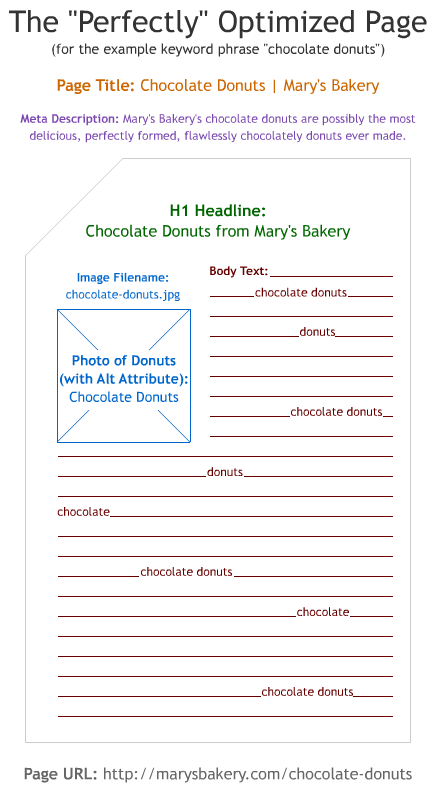
  3. Structure your website content correctly while making sure at least the following elements have keywords (“the”,”and”,”etc” don't count) :
    1. Page title ( 65-75 characters with more important keywords closer to the start
    2. URL 
    3. Introduction paragraph 
    4. Page description (to display on search result, keyword scoring isn't consider, 160 characters approx) 4
    5. Images aren't crawlable so don't rely on them to deliver keyword content. Images should always have a descriptive "alt" attribute and a suggestive file name.4
    6. Provide information when linking, instead of "click here" use "more info on consulting services".

Does Google use the “keywords” meta tag?

No.2

Do spelling and grammar matter when evaluating content and site quality?

Indirectly. Although it doesn't impact search index score directly, high search scored websites tend to have well written content. Basically it’s common sense that easy to read and well written content tends to score better because users will link more frequently to it.3

Does translated content cause a  duplicate issue?

No, if they are in different languages and it's a quality translation. On the other hand if it's the same content on the same language (I.e: us.kaizen and uk.kaizen.com) then it might be penalized. 1:1 translation is fine.6

How should localization be handled domain wise ?

After top level domains (kaizen.com,kaizen.fr) sub domains are the next best choice7

Are Social Shares the Same as Links?10
In a word, no. Although there is evidence that social shares such as Tweets, Likes, and Plusses affect rankings, at this time links are considered a far superior and more lasting way to promote the popularity of your content than any other method.

Do pdf files rank the same as standard web pages ? 11

Generally no.This is due to the simple fact that usually a pdf file is less likely to be linked to because they require a higher time investment by the user(obviously pdf should be text based and not image based).

Quality content and reliable website linking to it are the most important steps 8

UK Kaizen Institute Consulting Group was designed with these facts in mind.

By moz.com

Bibliographic Reference

Matt Cuts is currently the head of Google’s Webspam team and he’s also responsible for developing SafeSearch first version.
Moz is a well known marketing and SEO company with almost a decade
1 - What is the ideal keyword density of a page? Matt Cuts (http://www.youtube.com/watch?v=Rk4qgQdp2UA)
2 - Does google use the “keywords” meta tag?Matt Cuts (http://www.youtube.com/watch?v=jK7IPbnmvVU)
3- Do spelling and grammar matter when evaluating content and site quality? Matt Cuts
6 - Does translated content cause a duplicate content issue? (http://www.youtube.com/watch?v=UDg2AGRGjLQ)
7 - How should I handle localized content? (http://www.youtube.com/watch?v=GyWx31GeQWY)
8 - On-Page Ranking Factors - SEO Best Practices - Moz (http://moz.com/learn/seo/on-page-factors)
11 - What are the best practices for PDF optimization? http://www.youtube.com/watch?v=oDzq-94lcWQ

Saturday, November 3, 2012

Building a Reporting Tool on Top of Analysis Services: Understanding OLAP


In order to effectively build a reporting tool, one first needs to understand On-Lyne Analytical Processing (OLAP).


1.1  What is OLAP?

OLAP can be viewed as a method of aggregating data in a way that facilitates the construction and interpretation of queries on multidimensional databases. OLAP tools give business analysts with reduced knowledge of query languages the ability to explore complex databases because it structures the data according to dimensions, hierarchies, levels and measures that are easily transposed to the nature of the business they are analyzing. Instead of dealing with complex notions like foreign keys, indexes and primary keys, the user intercepts dimensions like “Product” and “Time” and drills down through levels according to the desired degree of detail.

1.2  How does OLAP work?

OLAP relies on multidimensional cubes to aggregate data and the queries are defined considering the following principles:
·         Dimensions: Several defined areas that make sense to group the data. For example, it makes sense to aggregate all the months, weeks and days under the dimension TIME.
·         Hierarchies: How dimensions are structured. A dimension can have several hierarchies because the same data can be organized according to different rules.
·         Levels: Levels are like a zoom in and out tolls, they help the user to drill down and up in detail.
·         Measures: Measures, although a component of OLAP, are a specific dimension of the OLAP-Cubes that consists of the output the user wants to know, usually a numerical indicator.
Let’s consider the following example in order to understand each of the principles explained:
“A business analyst, working for a car dealer, wants to know the net sales and the gross sales in Germany during the first quarter of the current year.”
For this he needs to use the Sales OLAP cube that, for this purpose, has the following structure:

Dimensions
Hierarchies
Levels
Members (Examples)
Operational
Country
Country
Germany
Dealer
Make
Mazda
Stand
Major MAZDA, Inc
Time
Calendar/Standard Time
Year
2012
Quarter
Month
March
Day
3rd
Week Time
Year
2011
Week
25
Day
Monday
Measures
Measures
Measures Level
Net Sales; Gross Sales


In the example depicted the user could use the shaded blue parameters in order to query the OLAP cube. This is not the unique configuration to get this information, for example, to limit the sales to the first semester, instead of choosing the 1st and 2nd quarter, one could use the Month hierarchy, by drilling down from the Quarter hierarchy, and then select from January to June.
Organizations usually work with various cubes like stocks, prices, people, etc, but what is important to understand is how dimensions, hierarchies and levels work together to deliver the measures you are looking for on your reports.
OLAP is considered by Lloyd (2011) as one of the 4 components of Business Intelligence and this technology is usually present in the various BI solutions available in the market. One of them is the SQL Server from Microsoft that guarantees OLAP through the Analysis Services. There are various ways to build a reporting tool on top of this OLAP solution, especially through the use of Excel. This will be the theme of the next post where the reader will finally be able to know everything he needs to decide how he must build his reporting tool. 

Sunday, October 28, 2012

Direct Mail TYPO3 "content could not be fetched" solution

Possible solution for "The plain text content could not be fetched.The HTML content could not be fetched."

TYPO3 is a good CMS and a lot of people seem to be using it. One famous and handy extension is the direct_mail which allows, among other things, to send newsletters.

Recently I was trying to add this extension to my TYPO3 instance but when I tried to make a newsletter based on a page, internal or external, I would always get "HTML content could not be fetched".

There seems to be multiple reasons for this issue but I'll focus on the one that I had and required code debugging.

I was using the latest direct_email version 3.02, had "allow_URL_fopen=ON" and "use CURL"  activated on TYPO3’S install tool. If you want to change allow_URL_fopen do it in you php.ini.

My solution for the direct_mail extension "content could not be fetched" issue was

adding the IP mapping to the /etc/hosts file on the server...just wrote 192.168.101.31 my domain on /etc/hosts file....the IP was the server's network IP.
/etc/hosts
server_ip             mydomain.com

Why is this necessary:

direct_mail extension uses CURL to fetch the newsletter's page and as such it tries to connect to an address.and if the IP machine isn't mapped on the hosts file it will fail.

What I don't get is why direct_mail doesn t provide more info besides " The plain text content could not be fetched. The HTML content could not be fetched"

If you have any other solutions for this issue or if this didn't help let me know by adding coments.

Wednesday, October 3, 2012

Push notification to Web client


Due to the nature of the HTTP protocol pushing data to the client isn't a trivial thing. The flow of web communications is request-response, meaning that the server has a hard time sending data if there isn't a request from the client.
Server notifications where the client doesn't need to bee constantly asking if there are new events (polling) already exists in mobile OS, HTML5 Web Socket API and Server Sent Event. But until there is a higher implementation of this standard among the different browsers, developers still have to come up with some elaborated schemes to provide real time updates without constant page refresh.
This post presents a server notification approach in AJAX and using a Java Servlet environment.

There are multiple ways to accomplish this notification paradigm using AJAX but we'll be focusing on a low level solution based on long pulling.

Long Pulling

Long pulling, aka COMET, it's a very easy concept to understand but difficult to implement.

When a browser makes a request to a server, a HTTP connection is created between both. Normally the server replies immediately with data, for instance html content, and the connection closes. But if we could hold that request and only reply when there was something new then we would have a notification system in place.

For example, let's assume we wanted to track a football match and the user should be notified when a new game event happened. Now, we could periodically request the game state to the server, aka polling, or we could just ask once and the reply would only be sent when there was a new event, aka long pulling. This has two inconvenients, first how can the server successfully hold the request keeping the connection alive and what about request timeouts.

Holding the connection (sleep or wait):

The easiest method to keep the connection alive is by simply putting a sleep(time) within a while. This way you could hang the request while there isn't anything new and keep checking from time to time. This is a possibility but I personally prefer using .wait() because you don't need to set a time and you synchronize over an object and not a thread.

How wait() works:

What wait does is hold the thread execution until another thread sends a notification to resume. This is kinda what we want, the thread in charge of the HTTP request waits until the server has a new notification.
As sleep, wait also needs to be within a while loop because there can be uncontrollable interrupts that break a thread's waiting state. Another requirement of wait is the present thread owning the object on which wait is evoked. This basically means that only the calling thread has access to the object at the time of evocation, in other words wait is inside a synchronize block.

Notification Architecture Example:

Going back to the football example the following diagram illustrates a possible architecture of the notification system:

The "Thread Match Watcher" is responsible for monitoring the game status and every time there is an event, like goal or penalty, it will add to the events queue and notify every request thread that is waiting for new events. This notification is done by invoking notif.notifyAll().
Each client request has an event_id associated with it, which if it's the first request will start with 0, and if there is a queue entry on index = event_id then it will be immediately returned along with the remaining ones. The event_id will be incremented to match last_event_returned_index+1 and the client will make a consecutive request. If there aren't new events the Thread responsible for the request will invoke notif.wait() and waits on the notif object until a notification comes.

Requests timeouts won't be any trouble because we just need to issue a new request from the client, using the same event_id so we don't miss anything.

Obviously things might bot be as simple as this due to the issue of allocating a thread to a request...if there are thousands of threads waiting for notifications then resource management might became a problem. This can be resolved by setting a timeout variable that is set to true every 30 mins and invoking a notifyAll() on the notif object. This way all the request will be dropped and only the still active clients will re-request the new events.

Pseudo code:


/* request Thread: if there wasn't any new event */
synchronized(notif)
{
     while(!timeIsUp)
    {
        notif.wait();
        /*this will run on notif.notifyAll() or uncontrollable interrupt*/
        if(event_id<=eventsQueue.size()-1 && eventsQueue.get(event_id)!=null)
        {
             /* write response*/
             resp.getWriter().print(eventQueue.get(event_id));
             timeIsUp = true;
        }
    }
}

/* watcher Thread */
while(gameIsRunning)
{
        GameEvent event= getGameEvent();
        eventQueue.add(event);
        synchronized(notif){
           notif.notifyAll();
        }
}